Xbox has no built-in TikTok streaming, so you stream through a computer. The standard setup: connect the Xbox to a capture card, plug the card into a PC or Mac, and go live with TikTok LIVE Studio, TikTok's official desktop app. Without a capture card, you can run the Xbox app's Remote Play on your computer and capture that window. Either way you need LIVE access: 18+ and usually 1,000 followers.
Console gameplay does well on TikTok LIVE: viewers drop in from the LIVE feed, chat while you play and send Gifts during good moments. The tricky part is getting the picture from the console to TikTok. Below: who can go live, the three setups that work (with pros and cons), step-by-step instructions for the capture-card route, and tips for PlayStation owners.
Before you start: LIVE requirements
TikTok's support page lists the basic rules for going live:<!-- checked: 2026-10-16, https://support.tiktok.com/en/live-gifts-wallet/tiktok-live/what-is-tiktok-live -->
- You must be at least 18 to go LIVE.
- You need 1,000 followers to go LIVE, though this may vary across regions.
- Sending or receiving Gifts also requires being 18 (19 in South Korea).
LIVE and Gift features aren't available everywhere. If you're not there yet, our guide to the follower count TikTok asks for before LIVE covers the details and how to get there.
Three ways to stream a console to TikTok
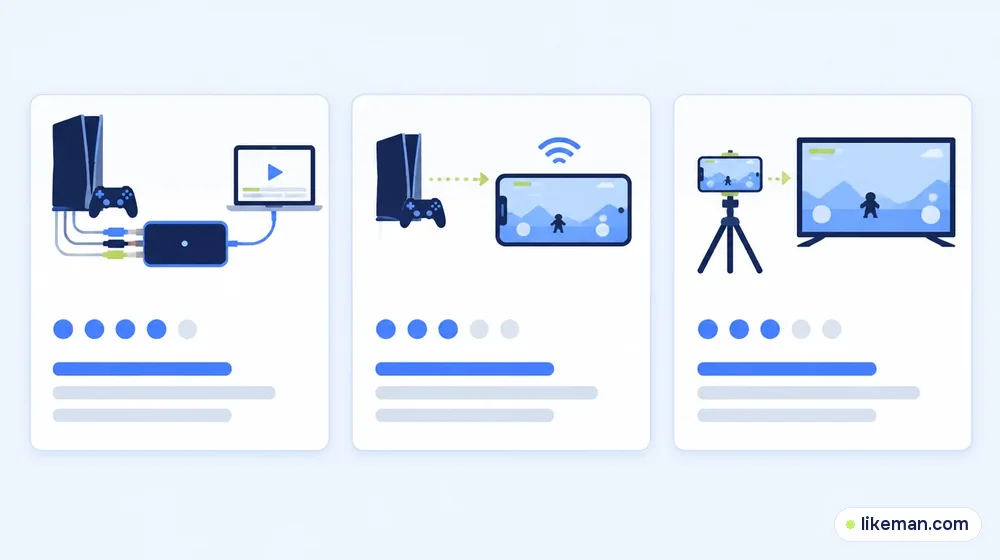
| Setup | Quality | What you need |
|---|---|---|
| Capture card + LIVE Studio | Best: smooth, low delay | Capture card, computer, LIVE Studio access |
| Remote Play on a computer + LIVE Studio | Good, depends on home Wi-Fi | Xbox app or PS Remote Play, strong network |
| Phone camera pointed at the TV | Basic | Phone with LIVE access and a stand |
Most console streamers start with Remote Play to test the waters and buy a capture card once they're streaming regularly.
Setup 1: capture card and TikTok LIVE Studio
TikTok describes LIVE Studio as its official desktop tool for LIVE content creation; it supports gaming streams, co-host, multi-guest, widgets and LIVE analytics. All LIVE creators who meet the access requirements can use it; you download it from TikTok's LIVE Studio page and log in with your TikTok account.<!-- checked: 2026-10-16, https://www.tiktok.com/studio/download -->
Steps:
- Connect the console. Xbox HDMI out → capture card HDMI in; capture card HDMI out → your TV or monitor (so you play without delay).
- Connect the card to the computer by USB.
- Install and open LIVE Studio, then log in to TikTok.
- Add a source: choose the capture card as a video capture device. You should see the Xbox picture.
- Add audio: game sound comes through the capture card; add your microphone separately.
- Choose the layout. TikTok is watched mostly on phones, so consider a vertical canvas with the game in the middle and your camera above or below.
- Add a title and go LIVE.
If HDMI capture shows a black screen, check the console's HDCP setting — Xbox and PlayStation block capture when HDCP is enabled for some content, and many games work fine once it's adjusted in the console's video settings.
Setup 2: Remote Play without a capture card
The Xbox app on Windows (and PS Remote Play for PlayStation) streams your console to the computer over your home network. Then:
- Start Remote Play and launch your game on the computer.
- In LIVE Studio, add a window or game capture of the Remote Play app.
- Add your microphone and webcam.
- Go LIVE.
This costs nothing extra, but quality depends on your network: wired Ethernet for the console and computer makes a big difference. Expect slightly more input delay than with a capture card.
Setup 3: phone camera on the TV
If you have LIVE access on your phone but no computer, you can stream by pointing the phone at the screen: tap +, choose LIVE, add a title and tap Go LIVE.<!-- checked: 2026-10-16, https://support.tiktok.com/en/live-gifts-wallet/tiktok-live/what-is-tiktok-live --> Use a stand, dim the room lights to avoid reflections, and keep the phone close to the TV. It looks less polished, but some "couch streaming" channels make the casual style part of their charm.
What about PlayStation?
The same three routes work for PS5 and PS4: a capture card into LIVE Studio, PS Remote Play on a computer captured as a window, or a phone camera. PlayStation's own broadcasting doesn't list TikTok, so a computer in the middle is still needed. Check HDCP settings on PS5 if your capture card shows nothing.
Tips for a better console stream on TikTok
- Vertical-first layout. Put the action where phone viewers can see it; crop HUD elements that don't matter.
- Camera and voice. TikTok is personal — viewers stay for the streamer as much as the game.
- Short, clear titles like "Ranked grind to Diamond — chat picks my loadout".
- Engage chat every few minutes; pin a comment with your schedule.
- Mind music and copyright. Turn off copyrighted background music; in-game soundtracks can also be a problem for some publishers.
- Clip highlights into regular TikTok posts the next day — they bring new viewers to your next LIVE. Our guide to gaining TikTok followers explains how posts and LIVE work together.
- Know the money side: Gifts turn into earnings for eligible creators — see what TikTok pays.
How it works at LikeMan
New gaming clips cut from your streams can stall at a few dozen plays. LikeMan offers TikTok views placed via each clip's link; your password and stream key never leave your hands. The exact price is visible first, processing needs no further input, and a twelve-month refill covers any decline. Views on clips don't chat or send Gifts during your LIVE; they make a highlight look less empty, while the stream itself builds the community.
FAQ
Can you stream directly from an Xbox to TikTok?
No. The Xbox doesn't offer TikTok as a broadcasting destination, so you stream through a computer (capture card or Remote Play) or with your phone's camera.
Do I need a capture card to stream Xbox on TikTok?
Not necessarily. Remote Play on a computer captured in LIVE Studio works without one, though a card gives better quality and less delay.
How many followers do I need to go live on TikTok?
TikTok lists 1,000 followers and an age of 18+, though the threshold may vary across regions.
Can I use OBS instead of LIVE Studio?
TikTok says LIVE Studio and OBS have similar functions; LIVE Studio is TikTok's own tool and works by logging in to your account.
Conclusion
To stream Xbox on TikTok, route the console through a computer: a capture card into TikTok LIVE Studio gives the best result, Remote Play is the free alternative, and a phone pointed at the TV is the simplest fallback. PlayStation works the same way. Make sure you meet TikTok's LIVE requirements, design for vertical screens, talk to chat — and turn your best moments into clips that bring viewers back.