
To see liked reels on Instagram, go to your profile, tap Menu (☰), open Your activity, then under Interactions tap Likes. You'll see the 300 most recent posts and reels you've liked, and you can sort them by date, filter by date range or by author, and unlike several at once. Reels that have since been deleted won't appear.
You liked a reel last week — a recipe, a workout, a joke you wanted to send a friend — and now it's lost in an endless feed. Instagram keeps a record of your likes, but it's tucked away in settings. Below: the exact path on the phone and computer, how to find one specific reel fast, what the limits are, and who else can see what you like.
Where liked reels are stored
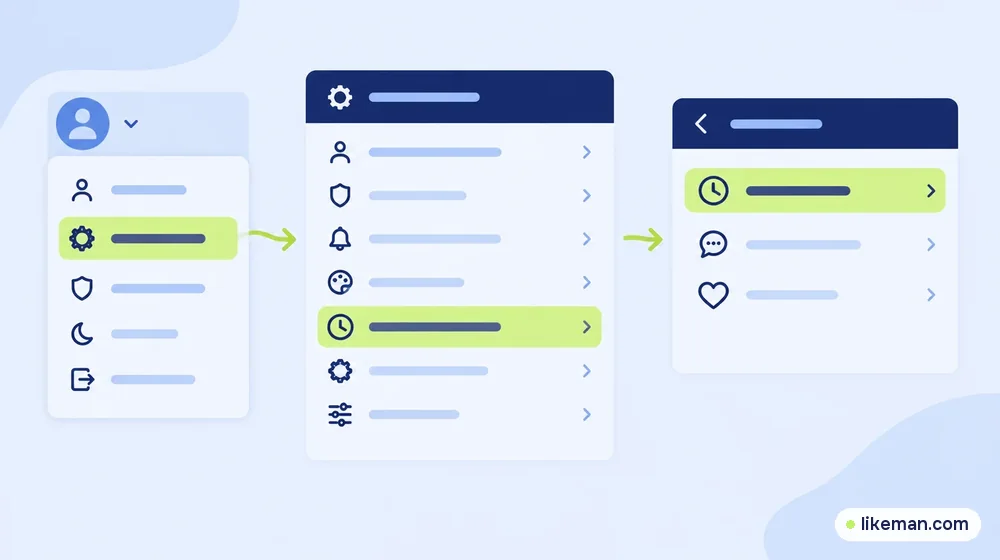
Instagram's Help Center describes the path for viewing your 300 most recent liked posts:<!-- checked: 2026-10-16, https://help.instagram.com/367550509992787/ -->
- Tap your profile picture in the bottom right.
- Tap Menu (three lines) in the top right.
- Under How you use Instagram, tap Your activity.
- Under Interactions, tap Likes.
- Tap any reel or post to open it.
Reels and photo posts are mixed together in this list. Reels show a small video icon or play automatically when you open them.
How to find a specific liked reel quickly
The Likes screen has sorting and filters, which save a lot of scrolling:<!-- checked: 2026-10-16, https://help.instagram.com/264538255661767/ -->
| Control | What it does | When to use it |
|---|---|---|
| Newest to oldest | Switches the chronological order | You liked it a long time ago |
| All dates | Limits the list to a date range | You remember roughly when |
| All authors | Shows likes for chosen accounts only | You remember who posted it |
The author filter is the fastest: pick the creator's account, tap Apply, and only their reels and posts remain.
Limits: what you won't find
- Only the latest 300. Older likes don't show in this list. If you like lots of reels every day, 300 can cover just a few days.
- Deleted reels disappear. If the creator removed a reel you liked, you won't be able to see it anymore.
- Private or blocked accounts. If an account went private and you don't follow it, or it blocked you, its reels won't open.
- Saved isn't the same as liked. Reels you bookmarked live in Saved on your profile, not in Likes.
That's why saving is the better habit for reels you want to keep: collections have no 300 limit and you can name them by topic.
Viewing liked reels on a computer
In a web browser you'll find the same history under More (☰) at the bottom of the left menu → Your activity → Likes. The filters work the same way, and the bigger screen makes scanning thumbnails easier. If the option isn't visible, update your browser and log in again.
Unliking several reels at once
The same screen lets you clean up your likes in bulk:<!-- checked: 2026-10-16, https://help.instagram.com/264538255661767/ -->
- Open Your activity → Likes.
- Tap Select in the top right.
- Tick the reels and posts you want to unlike (use the filters first if you're looking for a particular account).
- Tap Unlike at the bottom, then confirm.
Instagram recommends using the latest version of the app for this.
Who can see the reels you like
Instagram now lets you decide who can see your likes on other people's posts and reels. Go to Profile → Menu → Likes you've made and choose one of four options: everyone, people you follow, your close friends, or no one.<!-- checked: 2026-10-16, https://help.instagram.com/963701761845404/ -->
Two things don't change with this setting:
- The creator always knows. The account that posted a reel can see that you liked it, whatever you choose.
- You always see your own likes on posts, reels and in Your activity.
If you'd rather your friends didn't see the reels you like, set the option to Don't allow anyone to see likes.
Reels your friends liked
If you're looking for reels your friends liked rather than your own, there's no general list of someone else's likes. Depending on their Likes you've made setting, you may see that a friend liked a reel when it appears in your feed. Another option is Blend: a shared reels feed inside a chat, built from content suggested for each participant and refreshed daily. Each reel in a blend is labelled with the person it was suggested for. Blend is new and may not be available to everyone.<!-- checked: 2026-10-16, https://help.instagram.com/1373871660453442/ -->
Make it easier next time
- Save instead of liking reels you'll need again — recipes, tutorials, places.
- Create collections like "Cooking" or "Travel" in Saved.
- Send the reel to yourself in a chat with a note if you want to remember why it mattered.
- Like freely, save deliberately: likes help the algorithm learn your taste; saves are your personal library.
For creators: why likes on your reels matter
For creators, every like is a signal that a reel resonated. Comparing likes with plays shows which topics hit — the plays side is covered in our breakdown of Reels view counting. Publishing when your followers are online helps too: our weekday posting-time analysis has the slots.
How it works at LikeMan
When a clip sits at zero likes for its first hours can look unconvincing to new viewers. LikeMan provides Instagram likes through a reel or post link and never asks you for login details. You pay the amount shown, delivery starts without extra steps, and any shortfall during the year after your order is refilled. Ordered likes are a starting signal — they don't save or share your reel, so the content itself still has to earn repeat visits.
FAQ
Why can't I see all the reels I've liked?
Your activity shows only the 300 most recent likes, and reels deleted by their creators are removed from the list.
Can I see liked reels from years ago?
Not in the Likes list. If you need older activity, you can request a download of your Instagram information; for the future, save reels you want to keep.
Does the creator know I liked their reel?
Yes. The account that posted the reel can always see that you liked it.
Can my friends see the reels I like?
Only if your Likes you've made setting allows it. You can limit it to people you follow, close friends or no one.
Conclusion
To see liked reels on Instagram, open Profile → Menu → Your activity → Likes. Use the sort, date and author filters to find a reel in seconds, and the Select button to unlike several at once. The list stops at your latest 300 likes and drops deleted reels, so save the reels you'll want again — and choose in Likes you've made who gets to see what you like.