
To pause an Instagram Reel in the current app, tap the video once — playback stops and a mute button appears on screen. Tap again to resume. If a tap only switches the sound on and off, your app is older or you're watching from the feed: press and hold the reel to freeze it, and update Instagram to get one-tap pause.
Pausing a reel sounds trivial until you try to read a recipe, copy a code or show a friend a frame — and the video keeps looping, or the sound cuts out instead. Below: how pausing works today, why the gesture changed, where it differs between the Reels tab, the feed and a computer, and what to do when nothing seems to work.
Ways to pause a reel at a glance
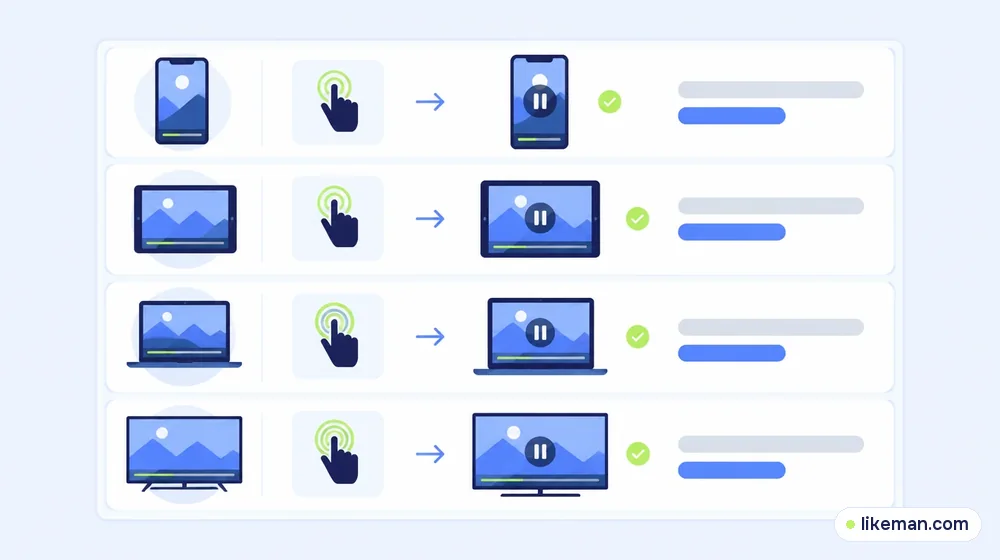
| Where you watch | How to pause |
|---|---|
| Reels tab, current app (iPhone and Android) | Tap the video once; tap again to play |
| Older app versions | Press and hold the screen; lift your finger to continue |
| Reels in the home feed | Open the reel full screen first, then tap or hold |
| instagram.com on a computer | Click the video, or use the on-screen controls |
| Reel cast to a TV | Use the TV app's controls or your remote |
How one-tap pause works now
For years, tapping a reel did one thing: it toggled the sound. To stop playback you had to hold your finger on the screen. In March 2026 Instagram announced that any reel can be paused with a single tap. When a reel is paused this way, the mute control is displayed on screen, so sound is now one extra tap away rather than the default tap action.
Step by step on iPhone or Android:
- Open a reel in the Reels tab or from someone's profile.
- Tap anywhere on the video. Playback freezes and a pause indicator appears.
- To turn the sound off while paused, tap the mute icon.
- Tap the video again to continue.
Instagram rolls out changes gradually, so the behaviour may arrive at different times for different accounts and regions.
Why a tap sometimes only mutes the sound
Instagram's Help Center still describes the older behaviour for reels in your feed: tapping a reel while it plays turns its sound on or off, and you can also use your phone's volume buttons to switch the sound on.<!-- checked: 2026-10-16, https://help.instagram.com/661002703914406/ --> So if tapping mutes instead of pausing, check three things:
- Where you are. Inside the home feed, the tap may still control sound. Open the reel full screen, or go to the Reels tab.
- Your app version. Install the latest Instagram build through your phone's app store; one-tap pause needs a recent version.
- Gradual rollout. If you're updated and it still mutes, the feature may not have reached your account yet — use press and hold meanwhile.
Press and hold: the method that works everywhere
Holding your finger on a reel freezes it on older and newer versions alike. While you hold, the captions and buttons usually fade so you see a clean frame — handy for screenshots of recipes, slides or text. Lift your finger and the reel continues.
Tips for holding without hiding the important part:
- Hold near the edge of the screen rather than over the text you want to read.
- Use a second finger to take a screenshot with your phone's buttons while holding.
- If the reel moves on to the next one, you probably swiped slightly — keep your finger still.
Pausing Reels on a computer
On instagram.com, select Reels in the left menu to open the Reels feed.<!-- checked: 2026-10-16, https://help.instagram.com/2027685808023874/ --> In the browser, clicking the video normally stops and starts it, and the speaker icon in the corner controls sound. If clicks don't respond, make sure the page has finished loading and that no browser extension is blocking video controls.
Pausing a reel you've cast to a TV
In the United States, Instagram lets you cast reels from your phone to a compatible TV through Instagram for TV. While a reel is playing on the TV, you can keep using Instagram on your phone, including watching other reels and sending messages.<!-- checked: 2026-10-16, https://help.instagram.com/2113877722878734/ --> Pause the TV playback with the TV app or your remote; tapping the phone affects only what plays on the phone.
Other playback tricks worth knowing
- Rewind or scrub. On many versions, dragging along the progress bar at the bottom of a longer reel moves backwards or forwards.
- Save to watch later. Tap the share or bookmark option to save a reel to a collection when you don't have time to pause and read now.
- Screenshots of a paused frame don't notify the creator in Reels.
- Volume buttons. If you want sound back without tapping, press your phone's volume up button while the reel plays.
For creators: make reels people want to pause
Viewers pause when there's something worth keeping: a list, a recipe, a price, a code. That's useful for you — paused and rewatched reels hold attention longer. Put key information on screen for at least two seconds, use clear fonts, and say "pause here" when you show something detailed. To understand how replays show up in your numbers, read how Instagram counts Reels views; to pick a slot when your audience is active, see the best posting times by weekday.
How it works at LikeMan
Fresh reels with almost no plays can get skipped by the very people they were made for. LikeMan offers Instagram views ordered with the reel's public link, and we never need your login. The order total is visible before payment, processing begins automatically, and views lost within a year of ordering are replaced. Views are a first push only — they don't pause, save or share — so pair them with content that gives people a reason to stop and look.
FAQ
Why does tapping a reel mute it instead of pausing?
You're probably in the home feed or on an older app version. Open the reel in the Reels tab, update Instagram, or press and hold to pause.
How do I pause a reel without the buttons covering it?
Press and hold: on most versions the overlays fade while your finger is on the screen.
Can I pause Instagram Reels on a computer?
Yes. On instagram.com, click the video to stop or start it.
Does the creator know if I pause or screenshot their reel?
No. Instagram doesn't notify creators about pauses or screenshots of reels.
Conclusion
In the current Instagram app, one tap pauses a reel and shows the mute control; another tap resumes it. If a tap still mutes, you're in the feed, on an older version or waiting for the rollout — press and hold works everywhere. On a computer, click the video; on a TV, use the remote. Update the app once and pausing becomes as easy as it should be.