
On Facebook* Messenger, "sent" means your message left your phone and reached Messenger's servers — you see a circle with a check. "Delivered" means it reached the other person's device — the circle with the check is filled in. "Seen" is a tiny version of their profile picture under your message. A message stuck on "sent" usually means their phone is offline or they haven't opened Messenger yet.
These little icons answer the questions everyone has after sending something important: did it go through, did they get it, have they read it? Below: what each icon means according to Messenger's Help Center, the typical reasons a message stays on Sent, what Sent can and can't tell you about being blocked, and how group chats differ.
The four Messenger status icons
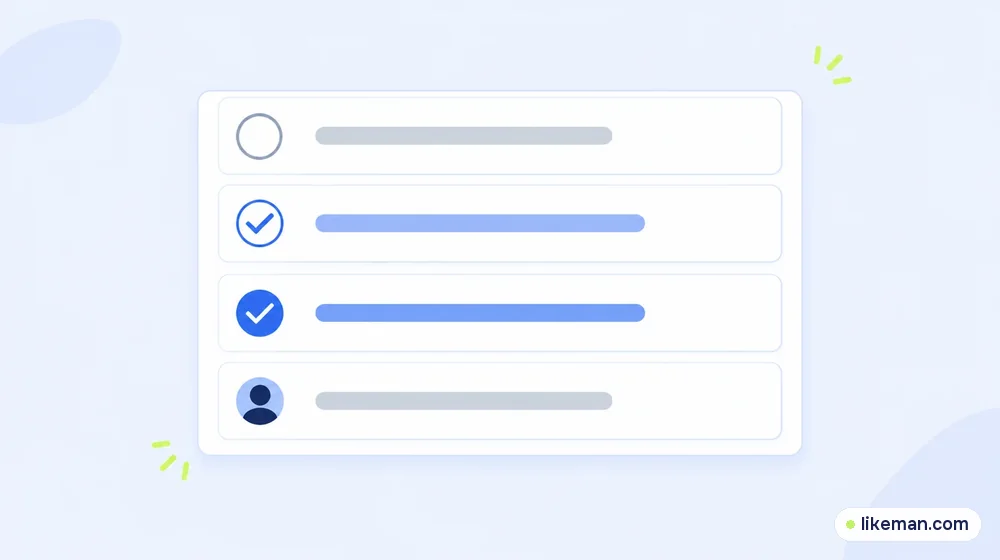
Messenger's Help Center lists the icons that appear on the right side of your message:<!-- checked: 2026-10-16, https://www.facebook.com/help/messenger-app/926389207386625/ -->
| Icon | Status | What it means |
|---|---|---|
| Empty blue circle | Sending | Your message is still on its way out |
| Blue circle with a check | Sent | The message left your device |
| Filled-in blue circle with a check | Delivered | It reached the recipient's device |
| Small profile picture | Seen | The person has opened the conversation |
On a computer and in the app the icons look the same, though they're small — zoom in if you're not sure whether the circle is outlined or filled.
Sent vs delivered: the real difference
Sent confirms only your part of the journey. The message reached Messenger, but the other person's phone or browser hasn't fetched it yet.
Delivered confirms their part too. The message is now on their device; they may have got a notification, but they haven't opened the chat.
So the gap between Sent and Delivered is about their connection and app, not about whether they want to read you. The gap between Delivered and Seen is about their attention.
Why a message stays on "Sent"
The most common reasons, roughly from most to least likely:
- Their phone is offline — switched off, flight mode, no signal or no data.
- They haven't opened Messenger in a while and background refresh is off.
- They use Facebook* but not the Messenger app, and haven't checked messages on the web.
- Your message went to Message requests because you aren't connected; it can sit there until they look.
- They've restricted or blocked you — possible, but not something the icon can prove.
Give it time. Many messages switch to Delivered as soon as the other person's phone reconnects.
Does "Sent" mean I'm blocked?
Not necessarily. A message that stays on Sent for days has many innocent explanations. Signs that point more strongly to a block include not being able to open their profile, their name appearing as plain text, or Messenger telling you the person isn't available. Even then, an account might simply be deactivated. Avoid jumping to conclusions — and don't use third-party apps that claim to reveal blocks; they ask for your login and can't see anything Messenger doesn't show you.
Delivered but not seen: what it means
Delivered without Seen means the message is on their device but the conversation hasn't been opened. They might have read a preview in a notification, be busy, or be deliberately leaving it for later. Messenger doesn't tell you which. In some chats people can also have read receipts limited — if the profile picture never appears even in an active conversation, that may be why.
Group chats
In a group, each person's tiny profile picture appears under the last message they've seen. That lets you see who has caught up and who hasn't. Delivered and Sent work for the message as a whole, so in big groups the "Seen" avatars are the useful signal.
Tips for getting a reply
- Keep the first message short and clear — previews show only a few words.
- Avoid sending many messages in a row; one complete message is easier to answer.
- Check if you're in Message requests — if you aren't connected, introduce yourself in the first line.
- Try another channel for urgent matters, like a phone call, if the message stays on Sent.
For Pages and creators
If you run a Facebook* Page, the same icons appear when you message followers who contacted you. Fast replies to people who message your Page build trust, and active Pages tend to look more credible. Our article on growing a Facebook* audience explains how Messenger fits into the bigger strategy.
How it works at LikeMan
People deciding whether to message a Page may hesitate when the follower count is tiny — it can look inactive. LikeMan offers Facebook* followers placed through your Page or profile link — no password or Messenger access required. The cost is fixed at checkout, the order is handled automatically, and any drop in the twelve months after ordering is covered by a refill. Followers from an order won't send you messages; quick, friendly replies to real people are what turn a Page into a conversation.
FAQ
What's the difference between sent and delivered on Messenger?
Sent (outlined check) means the message reached Messenger; delivered (filled check) means it reached the recipient's device.
How long can a message stay on Sent?
As long as the recipient's device is offline or they don't open Messenger — from minutes to days.
Does delivered mean they read it?
No. Delivered means it's on their device. Their profile picture under the message means they've seen it.
Can someone read my message without it showing Seen?
They may read the preview in a notification without opening the chat, so Seen won't appear.
Conclusion
On Facebook* Messenger, an empty circle means sending, an outlined check means sent, a filled check means delivered and a tiny profile photo means seen. Sent vs delivered is about the recipient's connection, delivered vs seen is about their attention. A message stuck on Sent rarely proves a block — give it time, check Message requests, and use another channel when it's urgent.